 QingYo
问题分析
最近部门开发了一个ssh的客户端(后面就称这个工具为XXShell吧),选了几个天使用户试用。其中有个用户反馈他有一个老旧机器死活连不上,而通过openssh自带的ssh连接却没有问题。 问题的入口总是日志,尝试通过XXShell连接这个ssh服务器时,从该服务器的/var/log/messages中可以看到这个日志:
Aug 21 17:43:40 linux-ofmzmc1 sshd[27281]: fatal: matching cipher is not supported: [email protected] [preauth]
为了排查这个问题,针对连接过程做抓包分析如下:
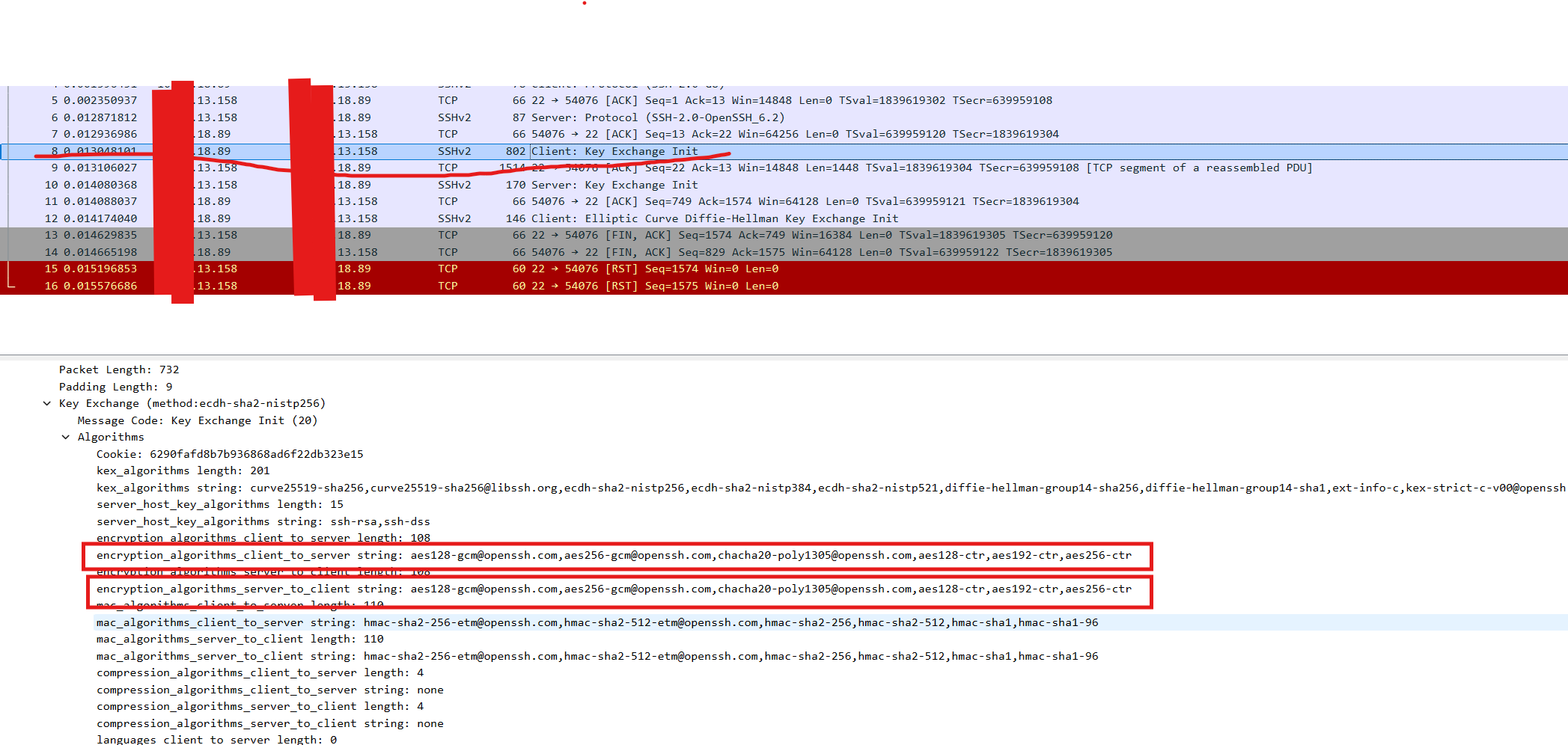
- XXShell 发送Key Exchange init ,当中,声明支持的加密算法为:[email protected],[email protected],[email protected],aes128-ctr,aes192-ctr,aes256-ctr
-
服务端发送Key Exchange inti,声明支持的加密算法为:aes128-ctr,aes192-ctr,aes256-ctr,arcfour256,arcfour128,[email protected],[email protected],aes128-cbc,3des-cbc,blowfish-cbc,cast128-cbc,aes192-cbc,aes256-cbc,arcfour,[email protected]
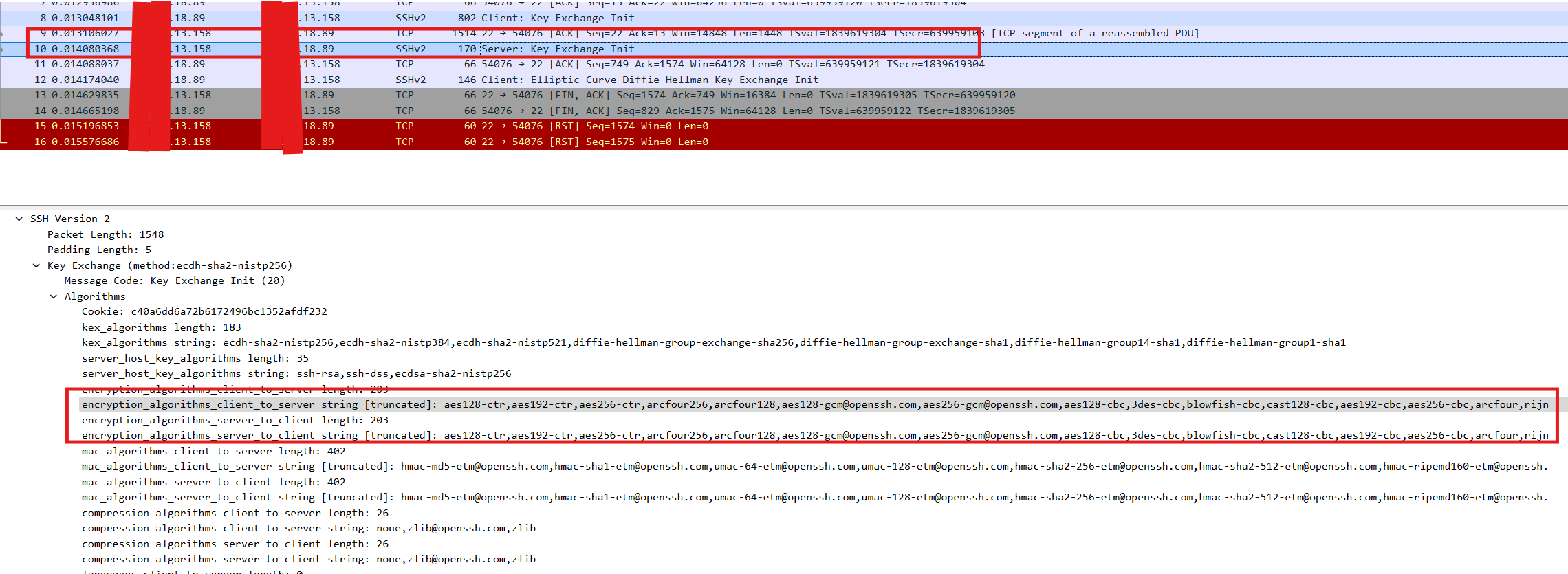
- 按照先后顺序进行匹配,ssh 服务端匹配到[email protected]作为加密算法。实际上,ssh服务端并不支持asegcm这种算法。因此key交换失败,主机返回一个reset。
- 抓包里显示客户端最后发的是 Elliptic Curve Diffie-Hellman Key Exchange Init 消息,但是实际上服务端FIN包 ACK的是749,也就是Elliptic Curve Diffie-Hellman Key Exchange Init 前面的那个包,因此实际上交互失败是 key exchange init。
-
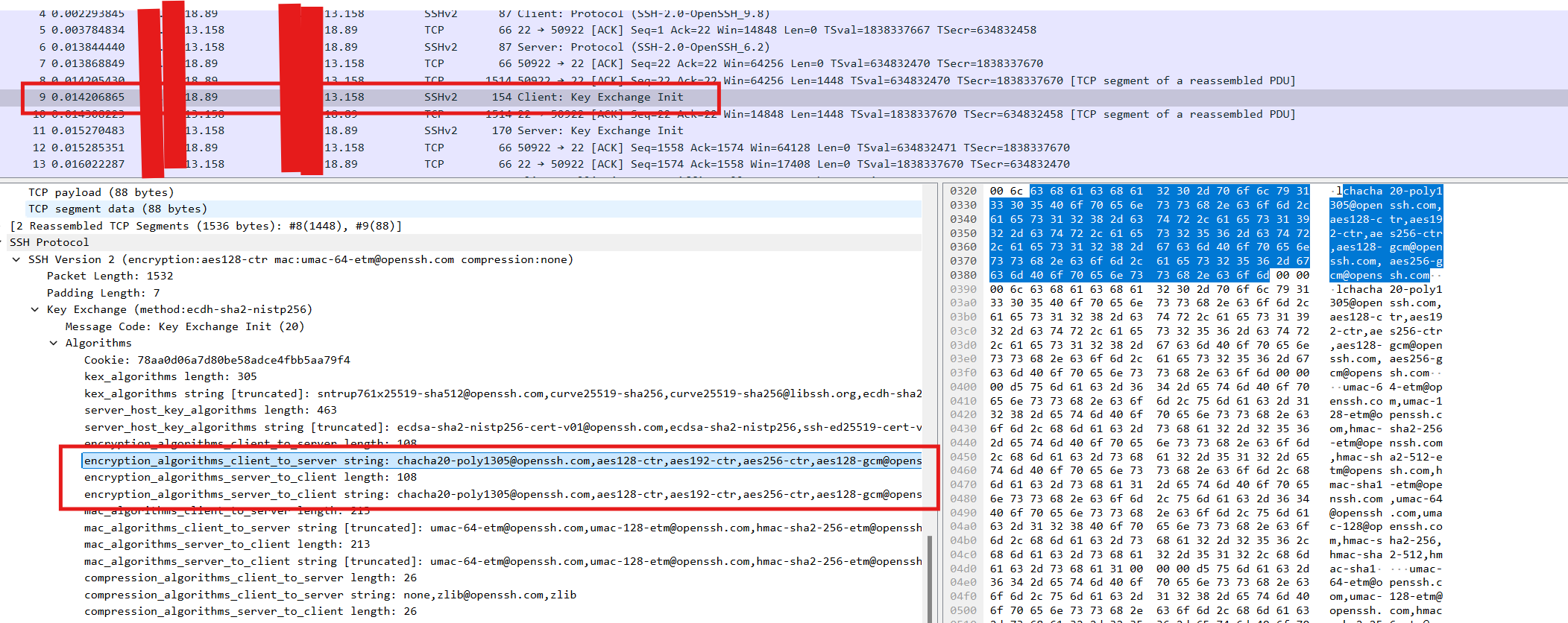
openssh客户端成功的原因:不同的ssh客户端实现对加密算法选择的优先级不同,比如openssh client的交互中,key exchange init里算法顺序为:[email protected],aes128-ctr,aes192-ctr,aes256-ctr,[email protected],[email protected];优先匹配到的就是aes128-ctr。
建议操作
这个故障出现的根因在于,ssh 服务端错误的认为自己支持AESGCM算法,但是实际上它并不支持,导致选择了错误的算法,因此key交换过程失败。Golang 倾向性选择安全性较高的算法,触发的这个bug。建议修改服务端ssh的配置,去掉aesgcm算法。
openssh server默认配置:
     Ciphers
             Specifies the ciphers allowed for protocol version 2.  Multiple ciphers must be comma-
             separated.  The supported ciphers are “3des-cbc”, “aes128-cbc”, “aes192-cbc”,
             “aes256-cbc”, “aes128-ctr”, “aes192-ctr”, “aes256-ctr”, “[email protected]”,
             “[email protected]”, “arcfour128”, “arcfour256”, “arcfour”, “blowfish-cbc”, and
             “cast128-cbc”.  The default is:

                aes128-ctr,aes192-ctr,aes256-ctr,arcfour256,arcfour128,
                [email protected],[email protected],
                aes128-cbc,3des-cbc,blowfish-cbc,cast128-cbc,aes192-cbc,
                aes256-cbc,arcfour
在/etc/ssh/sshd_config增加如下配置,覆盖当前默认值:
Ciphers aes128-ctr,aes192-ctr,aes256-ctr,arcfour256,arcfour128,aes128-cbc,3des-cbc,blowfish-cbc,cast128-cbc,aes192-cbc,aes256-cbc,arcfour
并重启sshd服务。
注意,在没有本地console登录的前提下,更新sshd配置有风险,建议执行 -T 参数校验下配置文件。